We have made easy for you as we made SWP Calculator Excel Sheet. Using this Excel sheet you can do your SWP Calculation in the form of Excel Sheet.
This sheet will help you to know vlaue of your future investment in SWP (Systematic Withdrawal Plan) in Excel Sheet.
Table of Contents
What Is SWP Calculator Excel Sheet ?
SWP Calculator in Excel Sheet will let you to do calculation of SWP (Systematic Withdrawal Plan) in easy way.
You can get your own SWP Calculator in the form of excel sheet and can do as much calculation as you can do free and offline.
| Feature | Details |
|---|---|
| File Name | SWP Calculator Excel Sheet.xlsx |
| File Type | Excel Spreadsheet (.xlsx) |
| File Size | 9.8KB (Approx.) |
| Purpose | Calculate SWP Future Value |
| Download Link | SWP Calculator Excel Download |
| Price | Free |
For Example,
Suppose you invest Rs 10,00,000 at once and want to withdraw money Rs10,000 per Month.
You are expecting 12% return for 10 Years .
You will get this kind of result in Excel.
Total Profit (Interest Earned): ₹1086547.79
Final Value of Fund: ₹886547.79
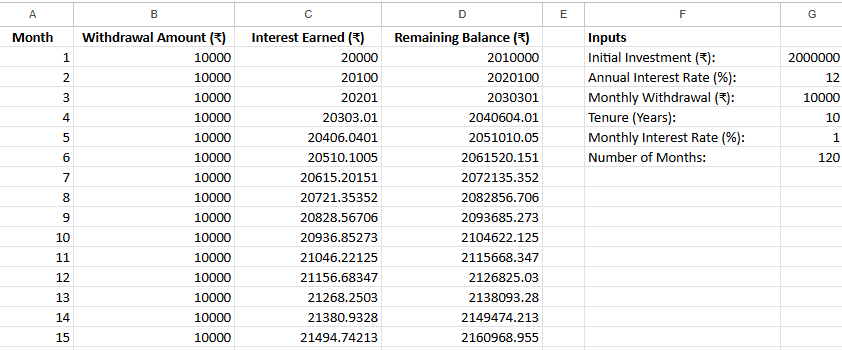
The Mathematical Formula Behind the SWP Excel Calculator
To accurately track your wealth, this Excel sheet utilizes a standard monthly compounding formula to calculate the remaining balance after each withdrawal.
The core logic is based on the Future Value of a present lump sum minus the Future Value of an ordinary annuity.
The formula used in the Excel cells is:
Remaining Balance = [P \times (1+r)^n] – [W \times \frac{((1+r)^n – 1)}{r}]$$
In this equation, P represents your initial principal or investment amount. The variable r is your periodic interest rate (annual return divided by 12), and n is the total number of months the withdrawal has been active.
Finally, W represents your fixed monthly withdrawal amount. By including this formula in your spreadsheet, you can see exactly how market returns and withdrawal rates interact to affect your long-term capital.
How to Use SWP Calculator Excel
SWP Calculator in Excel is very usefull tool in excel that alows the investors to track the their SWP investment by its own without visiting another website and keep it for own use in excel sheet.
This SWP Calculator excel sheet will make investor independent for SWP Calculation.
To use SWP Calculator Excel investors need to do the following steps –
Give input of the following data in Excel
- Initial Investment
- Annual Interest Rate
- Monthly Withdrawal
- Tenure (Years)
After puting this data you will get the exact vlaue of remmaing balance of investment and returns.
How to Download SWP Calculator Excel Sheet
One can easily download and use our SWP Calculator Excel absoulately free.
Below direct link is given to download to dwonload SWP Calculator Excel Sheet.
Click here For SWP Calculator Excel Download
Pros & Cons of Excel Calculator and Online Calculator
| Feature | Excel Calculator | Online Calculator |
| Offline Access | Yes | No |
| Custom Formulas | Yes | No |
| Data Privacy | High (Local File) | Medium |
| Live Market Data | No | Yes |
SWP Calculator (Systematic Withdrawal Plan Calculator)
Do More Calculation on our SWP Calculator , It will give you the more insight of different time frame and different investment.
It is very easy to use and light to load on mobile or desktop.
SIP Calculator In Excel Sheet Download Free
We have calculator for Excel sheet user. SIP Calculator In Excel Sheet allows you to do SIP calculation on your excel sheet.
Now you can use Check our SIP Calculator In Excel and download SIP Calculator In Excel sheet with formula free.
You can use SIP and SWP Calculator together excel sheet by download and using offline.
Click Here to Download SIP Calculator In Excel Download
FAQs
Is SWP Calculator Excel Sheet Free to download?
Yes, you can downlaod SWP Calculator Excel here free.
Can SWP Calculator Excel Sheet Do Mult Time frame Calculation?
Yes, SWP Calculator Excel Sheet Do Mult Time frame Calculation.
Is SWP Calculator Excel Sheet Free is editable?
Yes, You can edit SWP Calculator Excel Sheet as per your need.
Disclaimer : This article is for informational purposes only and does not constitute financial or investment advice. Returns and tax implications may vary based on market conditions and individual circumstances. Please consult a qualified financial advisor before making any investment decisions.

Navnit Kumar (ARN-183463) is an AMFI-Registered MFD and financial expert with 8+ years of experience. Author of the Amazon bestsellers Anybody Can Trade and Anybody Can Trade Options , Navnit simplifies complex strategies like SWP & SIP to help investors achieve sustainable financial freedom.
SWP Calculator Excel Sheet

We have made easy for you as we made SWP Calculator Excel Sheet. Using this Excel sheet you can do your SWP Calculation in the form of Excel Sheet.
Price Currency: Inr
Operating System: Windows, macOS, Android, iOS,
Application Category: Financial Application
5